Calotank Premium · iPhone
Photo calorie calculator
Take a meal photo or choose one from your phone. Calotank Premium estimates the calories so you can review and edit them before saving.
Free download. Photo and text estimates require a paid Premium subscription.
Available for iPhone. Coming soon to Android.
Take a photo. Check the estimate. Save your meal.
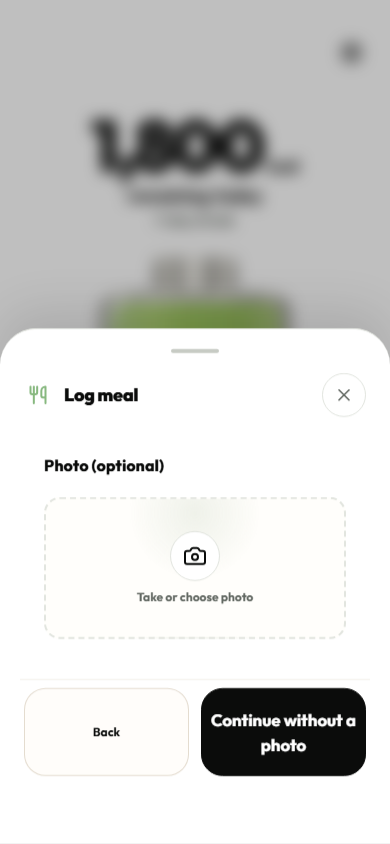
Take or choose a photo
Open meal logging in Calotank and choose the estimate option. Take a photo of your meal or choose one from your phone.
Add details and request an estimate
You can add information about the portion size or ingredients. Request an estimate and AI suggests a meal name and calorie amount.
Review and save
You can change the meal name and calories before saving. The saved meal is subtracted from your remaining daily calorie budget.
How accurate are calories estimated from a photo?
Calories calculated from a photo are an estimate. Portion size, preparation and ingredients such as oil or sauces may not be clear from an image. Add the quantities and ingredients you know in the description, and check the result before saving.
What should I add to my meal photo?
A photo may not show the portion’s weight or what is in a sauce. You can add a text description for the AI calorie estimate:
“My portion has 150 g of cooked rice and 120 g of cooked chicken. Both weights are after cooking. I added 5 g of olive oil to my own portion.”
This is an example description. Use your own meal’s details and include only quantities you know. Review the suggested meal name and calorie amount before saving.
If you already know the meal’s calories from a food label, for example, you can enter them yourself. Manual calorie logging is included in the free essentials.
Questions about photo logging
Is the photo calorie calculator free?
Photo and text estimates are part of the optional paid Calotank Premium subscription. Downloading the app and manually logging known calories are free. Check the Premium price and terms in the app before subscribing.
Can I describe a meal without a photo?
Yes. Continue without a photo and describe what you ate. Include the foods and quantities as best you know them. Text estimates also require Premium, and you can edit the result before saving.
Do I need an account, or can I use this in my browser?
You do not need a Calotank account. Photo estimates work in the Calotank iPhone app with Premium. This webpage explains the feature; you add your photos in the app.
Is Calotank available for Android?
The Android version is coming soon to Google Play. Calotank is currently available for iPhone, and this page’s instructions and screenshots show the iPhone version.
How is my meal photo processed?
When you request an AI estimate and accept the app’s AI consent, your photo and any text description are sent through Calotank’s service to OpenAI for processing. The image is not processed solely on your phone. See the privacy policy for processing and retention details.
Want to estimate your daily energy needs? Open the free daily calorie calculator.